Glento 5.5: Rebuilt to Feel Faster in Your Hands
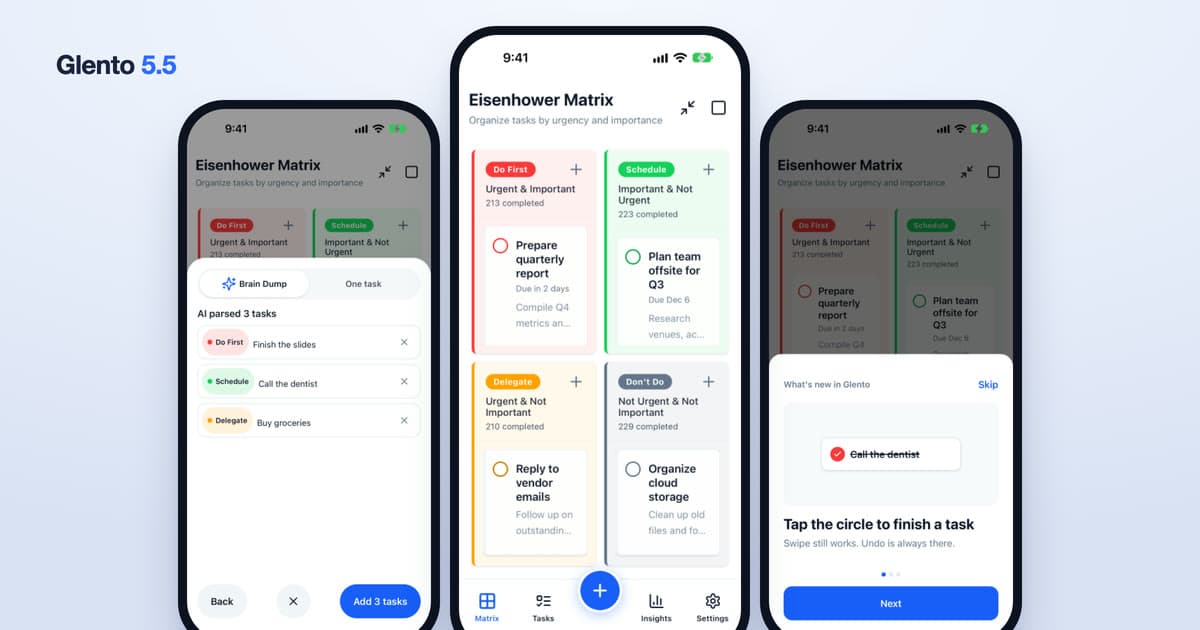
Glento 5.5 doesn't add a new screen. It changes how the ones you use every day feel. Finishing, moving, editing and adding a task all take fewer steps now, and each one answers the moment you touch it. The redesign is on iPhone and Android.
The short version
- Tap the circle on any task to finish it. Undo is right there.
- Hold a task to move it: drag it to any quadrant, or let go and tap where it goes.
- Edit in a sheet that opens from the card, with Done always within reach.
- Tap + and just talk. Brain Dump listens and sorts everything on your mind into your matrix (Pro).
- Start a Brain Dump from outside the app: Control Center, the Lock Screen, the Action Button or Shortcuts on iPhone, a Quick Settings tile or the app shortcut on Android.
- A short tour shows what's new, once.
- Fixed: Today's Focus marks finished tasks as done, and tasks past their due date save again.
Tap the circle to finish
Every task card now starts with a circle. Tap it and the task is done. That's the whole gesture.
Swiping still works if you're used to it. Either way, finishing, reopening and deleting a task happen at once, with no waiting, and every one of them offers Undo in case your thumb was faster than you meant.
Hold a task to move it
Priorities change. Moving a task to another quadrant is now one motion:
- Hold the card and drag it into any quadrant, or
- Hold, let go, then tap the quadrant where it belongs.
Double-tap to move is gone; holding replaces it.
Edit in a sheet
Tap a task to edit it. A sheet opens from the card, with the four quadrants (Do First, Schedule, Delegate, Don't Do) as chips at the top, so changing where a task lives is one tap.
Done is always enabled and sits just above the keyboard, so you never have to dismiss the keyboard to save.
Tap + and just talk
The + button now opens Brain Dump, already listening. Say everything that's on your mind, in one go: "finish the slides for Tuesday, call the dentist, buy groceries." Glento turns it into separate tasks and sorts each one into the right quadrant. You review the list, remove anything you don't want, and add them all at once.
Prefer typing? Tap the keyboard and type instead. You can switch any time.
Your voice is processed on your phone. As the app puts it, audio never leaves your phone.
Brain Dump is part of Glento Pro, and it's included in the 7 free days you get when you sign in. Without Pro, + opens the one-task Add screen you know, and Brain Dump is there to unlock when you want it.
Brain Dump without opening the app
The best moment to empty your head is often when Glento isn't open. Now you can start a Brain Dump from where you already are.
On iPhone:
- Control Center: add Glento's Brain Dump control when you edit Control Center.
- Lock Screen: add the same control to your Lock Screen.
- Action Button: set it to start a Brain Dump, on iPhones that have one.
- Shortcuts: use the Brain Dump action in your own shortcuts.
On Android:
- Quick Settings tile: add Glento's tile to your Quick Settings panel.
- App shortcut: long-press the Glento icon and pick Start a Brain Dump.
A short tour, once
If you used Glento before this update, a short tour shows you what changed the first time you open it: the circle, holding to move, and + to talk. It shows once and doesn't come back. Tap Skip if you'd rather find things yourself.
Two fixes
- Today's Focus marks finished tasks as done. Tasks you've finished now show a check and a strike-through, and Glento asks before reopening one.
- Tasks past their due date save again. In 5.4.2, editing a task whose due date had already passed could refuse to save with "Some fields need attention". It saves now.
One smaller one: under System default in the language list, your phone's language name now shows correctly.
Getting it
The update is rolling out now.
- iPhone: App Store
- Android: Google Play
- Web: app.glento.ai
The redesign is on iPhone and Android; the web app works just as before. Your tasks, your subscription and your data stay exactly where they were.
If something feels off, or you love a change, tell us. We read every message.