Start Dates Come to Glento: Tasks That Wait Until You Can Actually Start
The Eisenhower Matrix works because it answers one question: what should I do right now? Four quadrants, everything sorted, decision made.
That answer gets worse every time you add a task you can't act on yet.
The tax appointment in November. The renewal that opens in three weeks. The follow-up you can't send until someone else replies. None of them are urgent today. None of them are actionable today. But they sit in your matrix anyway, taking up room in the exact view you built to stop yourself from getting distracted — and every time you scan your quadrants, you re-read them and re-decide to skip them.
Today's update fixes that. Any task can now have a start date, and it stays out of your matrix until that day arrives.
The short version
- Set a start date on any task, right under the description.
- The task waits in a tab called Not started instead of cluttering your quadrants.
- On its start date it moves into your matrix on its own — no reminder to action, no relaunching the app, nothing to remember.
- Each quadrant shows a quiet line like "3 not started yet" so nothing is ever secretly hidden from you.
- Changed your mind? Start now pulls it forward immediately.
- It's free, on iPhone, Android, and the web app.
How it works
Open a task — new or existing — and you'll find a Start date field between the description and the due date, with a line under it that tells you exactly what it does: Hidden from the matrix until this date.
Pick a day. That's the whole interaction. On iPhone you get the wheel picker in a sheet, on Android the system date dialog, and on the web a month calendar in a popover. A Clear button next to the field removes it again.
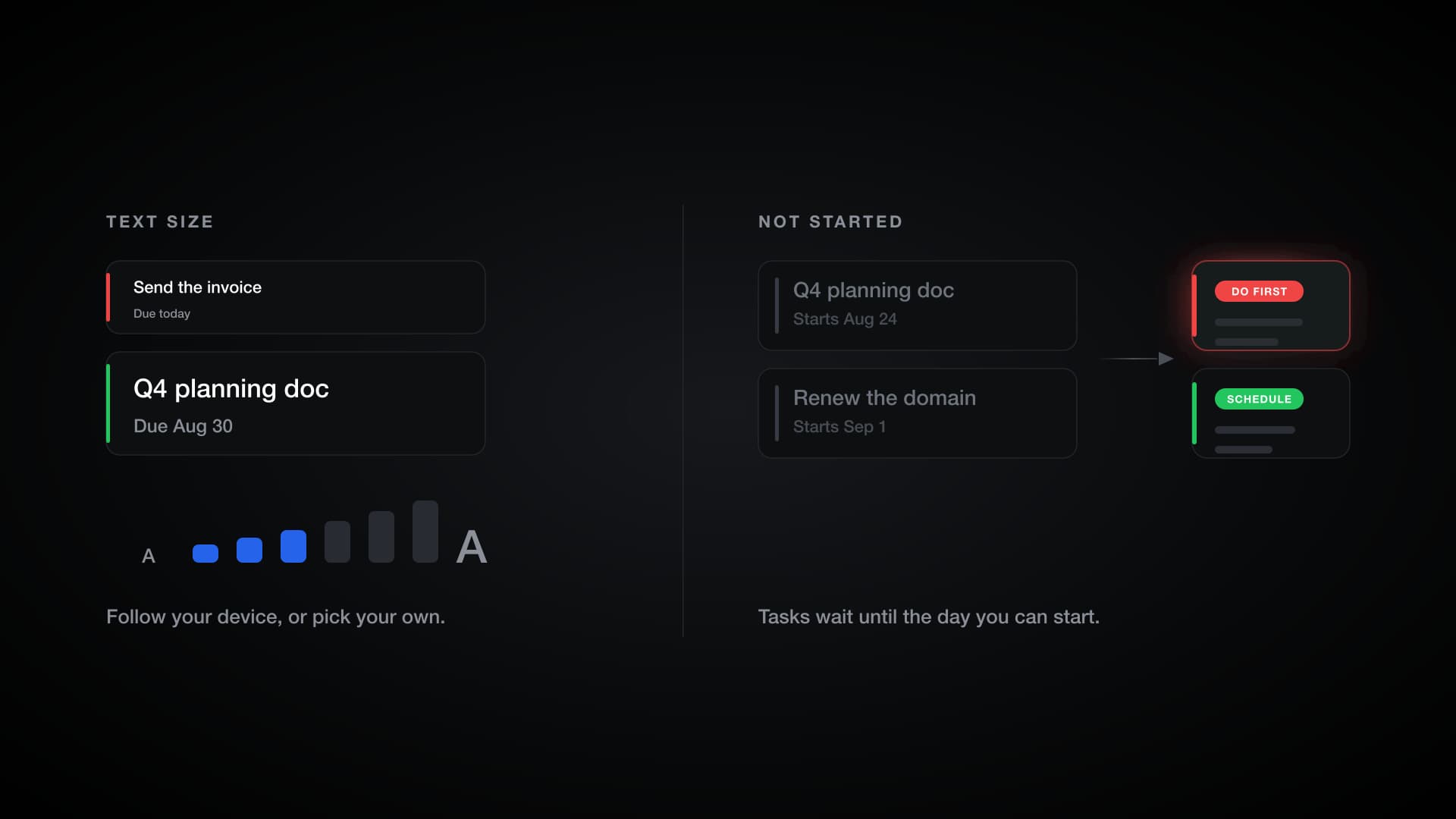
From that moment the task lives on the Not started tab, grouped under Starting later, with a small chip on the row showing when it wakes up: Starts Aug 24. The tab carries a count, so you always know how much is parked.
It moves on its own — including overnight
This is the part we spent the most time on, and it's the part you should never have to think about.
A task with a start date of tomorrow becomes active at midnight, in your local time. Not "next time you edit something." Not "next time you force-quit the app." At midnight.
If the app is open on your desk when the day rolls over, the task appears. If your phone was in your pocket all night, it's there the instant you unlock and look. If you're travelling and your clock jumps a time zone, the app uses your local day, not a server's. Daylight saving is handled too.
That sounds like a small thing. It wasn't — a task list that quietly goes stale at midnight is the kind of bug that teaches you not to trust the app, and it also affected recurring tasks before this release. Both are fixed.
Nothing disappears without telling you
The fastest way to make someone distrust a to-do app is to hide their work. So start dates are deliberately loud about what they're doing.
At the bottom of each quadrant, when there's something waiting, you'll see a line in a dashed outline: "3 not started yet." Tap it and you go straight to the Not started tab, where everything that's waiting is listed with the day it wakes up.
Your matrix stays clean. Your count stays honest. You're never more than one tap from the full picture.
Start now, when plans change
Sometimes the thing you parked until next Tuesday becomes today's problem.
On any row in the Not started list, Start now clears the start date and moves the task into your matrix immediately. One tap, no dialog, no re-editing the task.
Start date vs. due date: they're not the same thing
Most task apps only give you a due date, which is why so many people end up with a list where everything looks equally live. The two dates answer completely different questions.
| Start date | Due date | |
|---|---|---|
| The question it answers | When can I begin this? | When must this be finished? |
| Before the date | The task is out of your matrix | The task is in your matrix |
| On the date | Moves in automatically | Becomes due, then overdue |
| What it protects | Your attention today | Your deadline |
| Best for | Work that isn't actionable yet | Work with a real consequence |
They work together. "File the quarterly return" can start on the 1st and be due on the 15th: invisible until the window opens, then in Do First with two weeks of runway. Glento won't let you set a start date after the due date, because a task that arrives already late isn't useful to anyone.
If you've only ever used due dates, the shift is worth trying for a week. Due dates manage deadlines. Start dates manage attention — and attention is the thing the matrix is actually for.
Five things start dates are unreasonably good for
Waiting on someone else. You sent the email. There's nothing to do until they reply. Park it three days out instead of letting it stare at you.
Seasonal and annual work. Tax documents, insurance renewals, passport expiry, the annual review. These are important, entirely predictable, and completely useless to look at in July. Capture them the moment you think of them, dated to the month they matter.
Blocked work. The task that can't begin until the design lands, the deposit clears, or the previous phase ships. Give it your best guess at a start date, then use Start now when the block lifts early.
Deliberate "not this week." You know the project is important. You also know this week is full. A start date is a way to say later with a date attached, instead of guilt with no date attached.
Brain dumps without the flood. Dump everything on your mind, then push the far-off items forward. You get the relief of capturing it all without paying for it with a cluttered matrix for the next month.
A note on recurring tasks
Recurring tasks already had their own start date — the anchor that decides when the series begins — and it lives inside the Recurrence section where you set the pattern.
So the field you'll see depends on the task: turn recurrence on and the standalone Start date field steps aside, because the recurrence anchor is now doing that job. Same idea, one place for it.
What start dates don't do
Worth being precise about, so nothing surprises you:
- Your stats still count everything. Insights, streaks, and the heatmap look at all your tasks, not just active ones. Parking work doesn't quietly reshape your numbers.
- Due-date reminders still fire. If a not-yet-started task has a due date with a reminder, you'll still get it. Start dates control what's in your matrix, not what your phone is allowed to tell you.
- Widgets and Daily Focus stay focused on now. Not-started tasks are left out of your home screen widgets and out of the AI's daily picks, which is the whole point.
Text, at the size you actually read it
The other half of this release started as a support email that said, more or less, the font is ginormous.
They were right, and the cause was embarrassing: when your device's text size was turned up, Glento applied that scale twice. At the top of the normal iOS text-size range, text rendered about a third larger than intended, and at accessibility sizes it could reach roughly three and a half times the size it should have been. Layouts broke. Buttons collided. On top of that, the app only read your device setting once at launch, so changing it did nothing until you force-quit and reopened.
That's fixed. The scale is applied exactly once, and it now updates live — including iOS's per-app text size from Control Center.
And a dial of your own
Rather than stop at the fix, we added the control that should have been there from the start.
Settings → Display → Text size opens a screen with a live preview of real task cards and a step bar you can drag with your thumb. As you drag, the whole app resizes under your finger, with a small haptic tick at each step, so you're choosing by looking at the thing you'll actually be reading — not guessing from a menu.
By default it follows your device, which is how it should be: set your phone up once and every app respects it. Turn Use system size off and you get six fixed steps from 80% to 135%, seeded at whatever's closest to your current size so nothing jumps. Glento is the only app on your phone you want bigger? Now that's a thirty-second job.
iPad text now matches iPhone
If you use Glento on an iPad, text used to render 25% larger than on iPhone. That inconsistency is gone — iPad now uses the same sizes as iPhone, the way Apple's own apps do. If you liked it larger, Text size is the dial: two steps up and you're back where you were, this time by choice.
Compact mode got more compact
Compact mode — the setting that tightens spacing to fit more tasks on screen — now also slims the big screen titles across the Matrix, Tasks, Insights, Settings, and the task editor. It's roughly a task card's worth of extra room per screen, and it stacks with a smaller text size if you want maximum density.
Getting it
The update is rolling out now.
- iPhone and iPad — App Store
- Android — Google Play
- Web — app.glento.ai
Start dates are on all three, and they sync, so a task you park on your phone is parked on your laptop too. The Text size setting is a phone and tablet feature — browsers have their own zoom controls, and we'd rather not fight them.
Everything here is free. No Pro required, no trial to start, nothing gated.
If you try start dates and something feels wrong — or right — tell us. The best feature in this release came from one person writing in about a font size, which is a fairly good argument for writing in.
Not everything is for today. Now your matrix knows it.